Co-parenting allowance and chores: one balance, two homes
Allowance and chores for kids who live in two homes: one balance both parents see, chores that repeat every other week, and one list for both houses.
Kids who live in two homes don't need identical rules in both places. They need rules they can predict. A setup that works well for many co-parents is simple: a small core of chores that goes with the child, a few chores that belong to each home, and one balance both parents can see. Below is how to agree on that, how to make chores follow an every-other-week schedule, and what to do when the calendar changes.
Why chores get messy across two homes
Agreeing that chores matter is usually the easy part. The trouble is in the details:
- Two lists, two memories. One home has a chart on the fridge, the other has none. Your child forgets which chore belongs where, and nobody can check.
- Money with no shared record. Allowance gets paid in one home, forgotten in the other, or paid twice because both of you thought it was your turn.
- The child as messenger. "Dad said I don't have to" is hard to check when you only hear one side.
None of this requires the two of you to parent the same way. It requires a shared record. If expectations differ a lot between the homes, read different expectations in two homes before you set up any list.
Agree on a shared core, let each home keep its own
Talk to the other parent before you talk to your child. Ten minutes is enough if you stick to three questions.
1. Which chores go with the child? Pick two to four things that are the same in both homes. They are usually about the child's own things: make the bed, put dirty clothes in the hamper, pack their backpack, clear their own plate. Same chore, same expectation, wherever they wake up.
2. Which chores belong to one home? Walking the dog at one place, taking out the recycling at the other. These don't need to match. A child copes fine with "at Mom's I walk the dog" as long as it's written down somewhere.
3. How does money work? Decide whether chores are paid, roughly what they pay, and who hands over the cash. It's usually simplest when the child has one balance, not one per home. If a step-parent is part of the picture, agree who decides. See step-parent rules on allowance.
Here is an example for a child who alternates weeks:
| Week with Mom | Week with Dad | |
|---|---|---|
| Every day, both homes | Make bed, clear own plate | Make bed, clear own plate |
| Mon and Thu | Walk the dog | |
| Tue and Fri | Take out recycling | |
| Weekend | Tidy own room | Help with Sunday dinner |
| Paid extras | Wash the car ($3) | Rake leaves ($3) |
The columns are short on purpose. A child who changes homes every week already has plenty to keep track of.
Chores that follow the custody schedule
The hardest part of two homes is that a weekly chart is wrong every other week. In Kroni you fix that on the chore itself. Choose Set days, tap the weekdays, then choose Every other week. Pick Starting this week or Starting next week, and the form lists the next dates the chore lands on, so you can hold them up against your custody calendar before you save.
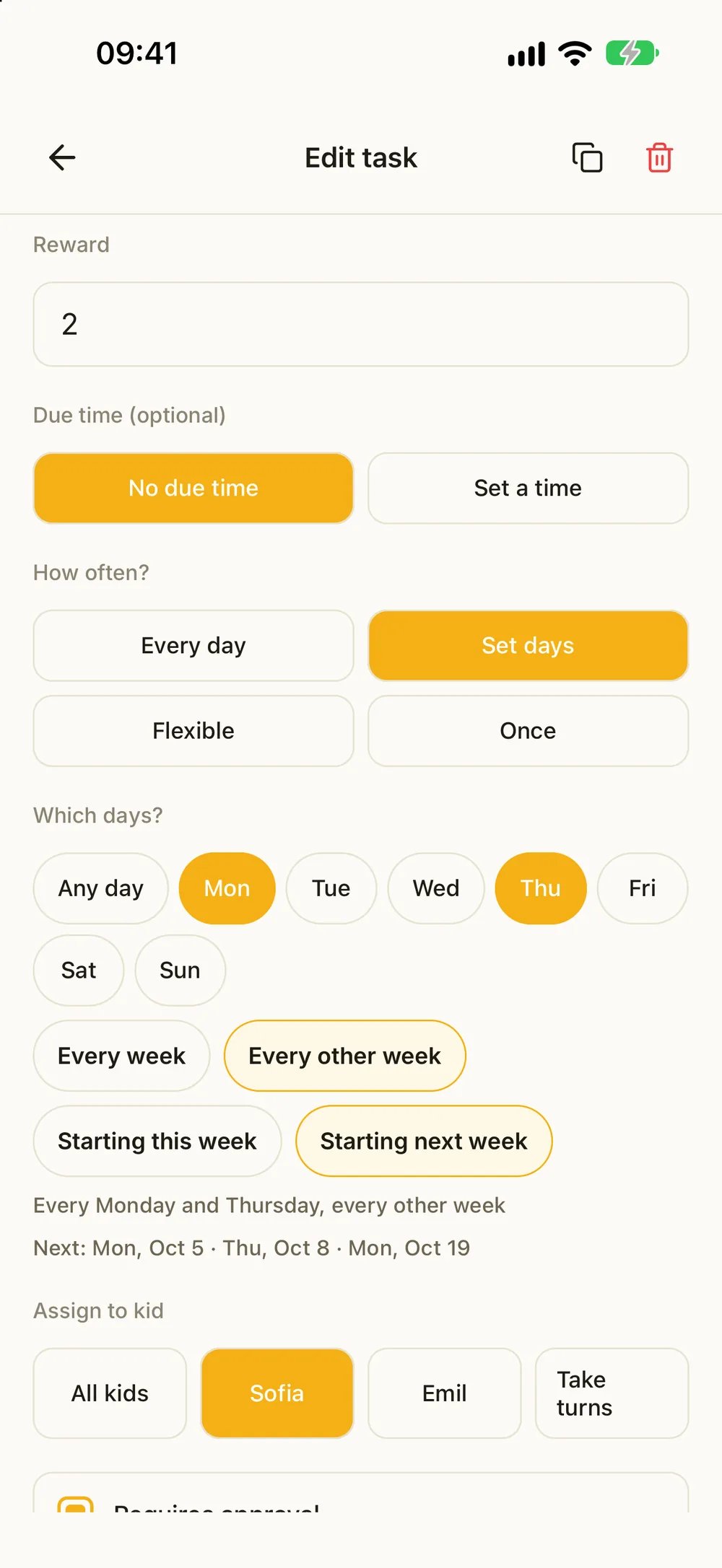
The chore only shows up on your child's list in the weeks you picked. Each parent can set up chores for their own weeks, so the dog walk appears in Mom's weeks and the recycling in Dad's, and nobody has to delete and re-add chores every Sunday. The chores that go with the child can simply run every day in both homes.
A few tips that save confusion:
- Put the home in the chore name when it isn't obvious, like "Walk Bella (Mom's)". Your child sees at a glance where it belongs.
- Check the first two weeks. Compare the dates the form lists with your actual handover days.
- Any schedule that repeats every two weeks fits. For every other weekend, choose Saturday and Sunday with every other week. For 2-2-3 or 5-2-2-5, set a chore to your days in one week, then duplicate it and give the copy your days in the other week, starting the opposite week. A schedule with no fixed rhythm needs a skipped date here and there instead.
For more on running one list across both homes, read how to build one shared list for both houses.
Both parents in the same family
One parent sets up the family and adds the child. Then invite the other parent with a code, a link or a text. You are now in the same family and share everything in it. Inviting a co-parent without creating a new family walks through it step by step.
What that gives you:
- The same list in both homes. You both see every chore, including the ones in the other home's weeks.
- Approvals from either phone. When your child marks a chore done, either of you can approve it. If it needs another go, send it back.
- One history. What was approved, and when, is there for both of you. Less to argue about, nothing to forward.
- A fix for the forgotten tap. If your child did a chore at your place but forgot to tap it, record it for yesterday or the day before.
Your child doesn't need a phone of their own for any of this. They can use a tablet, or switch to their profile on your phone in each home. Handing the phone over locks the parent side.
One balance that moves with your child
Your child has one balance, and it's the same in both homes. What they earn at Mom's is still there at Dad's. You can also set up a regular allowance every week, every other week or every month, and agree between you who hands over the money.
Kroni keeps the books and never moves real money. When one of you pays your child in cash or by transfer, take that amount out of the balance and it shows as Paid out in the history. The other parent sees it, and nobody pays twice. Balance explained for kids puts it in words you can share with your child.
When the calendar changes
Vacations, swapped weekends and sick days are part of life with two homes. A chore that can't happen shouldn't count as a failure.
- Skip a single date on a chore when your child is at the other home that day.
- Hand a day to a sibling who is home to do it. They do it and earn the reward.
- Plan a day off for a trip or a vacation. Pick the first and last day, and every chore on those days is skipped. Nothing counts as missed, and their streak stays safe.
Skip it, give a day off or hand it over goes through when to use which.
Getting started this week
- Agree on the core with the other parent (10 minutes). Two to four shared chores, plus what's paid and who pays out.
- Set up one family and add your child. Invite the other parent with a code, a link or a text.
- Each parent adds two or three chores for their own weeks, set to every other week.
- Show your child the list in both homes, and let them check off the first chore themselves.
- Check in after a month. Drop what never happens and keep what works. Change the list together, not behind each other's back.
If the other parent lives far away, the same setup works across the distance. Co-parenting across countries has more on keeping routines steady. For step-siblings and bonus kids, see blended family chores.
What it costs
Kroni is free to download for iPhone, iPad and Android, and the free version has no time limit. It covers one child and five active chores, and inviting the other parent is included. Five chores fill up quickly when both homes add their own, so keep the list short. Kroni Family unlocks unlimited kids and chores at one price for the whole family, and it covers both homes when one of you subscribes. You'll need it once siblings or step-siblings share the list. New subscribers get a 7-day free trial of Kroni Family.
Frequently asked questions
- Can both parents use Kroni for the same child?
- Yes. One parent invites the other with a code, a link or a text, and you share one family. You both see the same chores, balance and history, and you can both approve from your own phone. Don't set up a second family for the other home, or your child ends up with two separate balances.
- How do I make a chore show up only in the weeks my child is with me?
- Choose Set days and tap the weekdays, then choose Every other week. Pick whether it starts this week or next. The form lists the next dates, so you can check them against your custody calendar before you save.
- What if we swap a weekend or go on vacation?
- Skip a single date on a chore, or hand that day to a sibling. For a trip, plan a day off with a first and a last day. Every chore on those days is skipped and nothing counts as missed.
- Do both parents have to pay?
- No. A co-parent joins the same family. The free version has no time limit and covers one child and five active chores. Kroni Family unlocks unlimited kids and chores at one price for the whole family, both homes included.
- Does Kroni send money between the homes?
- No. Kroni keeps the books and never moves real money. When one of you pays your child in cash or by transfer, take that amount out of the balance as Paid out, so the other parent sees it too.

